


Sony PlayStation PS5 Vertical Stand

Quick Overview
- Playstation 5 Vertical stand Disc - Perfect Fit for PS5 console. It keeps your PS5 standing up. Please note that it is compatible with PS5 Disc Edition.
- Keep your PS5 Secure - Simple and Sturdy design. It makes your PS5 console stable. It has the non slip pad on the bottom so your PS5 console will not slip around.
- Help Heat Dissipation - It keeps your PS5 cooler when it's on for long periods of time. It allows for airflow.
- Save Space - It is very compact and takes up very little space. It helps to keep your desk or TV stand look clean.





How to attach a vertical stand to your PS5 console
The way you set up your vertical stand depends on the type of PS5® console you have. The PS5 model number can be found on the PS5 console's original packaging and the bottom of the PS5 console.
How to attach the stand to a PS5 console
Place your console on a soft cloth spread over a flat surface before attaching the stand.
Step 1
Go to the control centre and select Power > Turn Off PS5. The screen goes blank, the power indicator flashes white and then turns off.
Step 2
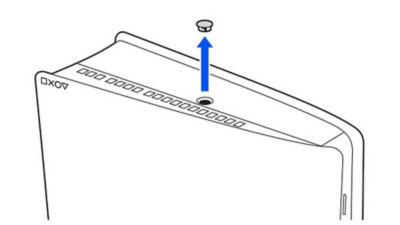
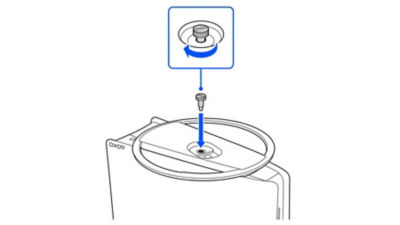
Place the PS5® console with the rear side facing up and then remove the screw cap.
Step 3
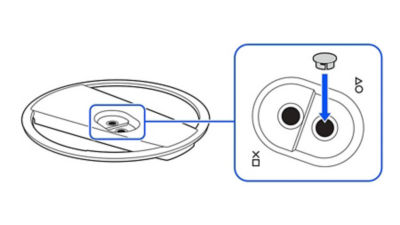
Attach the screw cap to the screw hole (marked with triangle and circle) on the stand.
Step 4
Align the screw hole (marked with cross and square) on the stand with the console’s screw hole, and then secure with the mounting screw using your hand. You can also use a coin to tighten the screw.
How to attach the stand to a PS5 console (CFI-1000 model group)
Place your console on a soft cloth spread over a flat surface before attaching the stand.
Step 1
Go to the control center and select Power > Turn Off PS5. The screen goes blank, the power indicator flashes white and then turns off.
Step 2
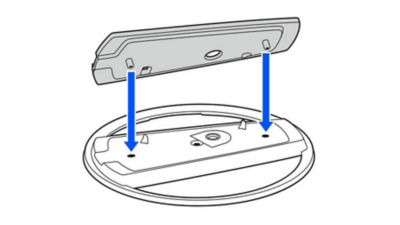
Fix the attachment to the stand. Insert the attachment into the raised part of the stand.

Step 3
Place the PS5 console with the rear side facing up and then remove the screw cap.
Step 4
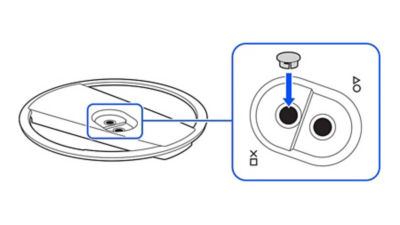
Attach the screw cap to the screw hole (marked with cross and square) on the stand. You can also use a coin to tighten the screw.
Step 5
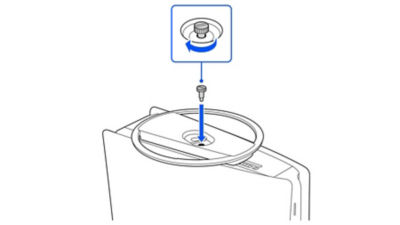
Align the screw hole (marked with triangle and circle) on the stand with the console’s screw hole, and then secure with the mounting screw using your hand. You can also use a coin to tighten the screw.
NBA 2K26 – PlayStation 4 (PS4)
Nintendo Switch Joy-Con Controller (Pastel Pink)
Sony PS5 Pulse Elite Wireless Headset - White
Sony PS5 DualSense Wireless Controller Nova Pink
Ride 5 PlayStation 5 (PS5
Super Mario Bros Wonder - Nintendo Switch
Legend of Zelda link's awakening - Nintendo Switch
Nintendo Switch 2 Pro Controller
Nintendo switch 2 camera
Nintendo Switch Lite 32GB Gaming Console-Turquoise

Sony PS5 DualSense Wireless Controller - Rhythm Blue


WWE 2K24 - PlayStation 5 (PS5)

Metal Gear Solid Delta Snake Eater Day 1 Edition - PlayStation 5 (PS5)

Sony PS5 DualSense Wireless Controller Volcanic Red

Sonic Racing: CrossWorlds - PlayStation 5 (PS5)
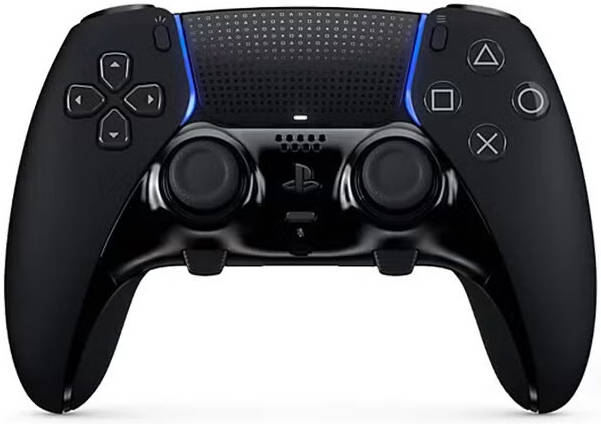

PS5 EA Sports FC 25 Video Game For PS5

PS5 Helldivers 2 Videogame PS5

Prince of Persia The Lost Crown PS4




Customer Reviews
No reviews yet. Be the first to review this product!
